


The DJI Osmo Pocket 4P makes the most sense when you regularly want a tighter shot than a wide-angle pocket camera can give you. Its dedicated 60mm-equivalent camera is the reason I'd consider it for portraits, travel details and distant subjects.
That doesn't make it the automatic choice over the Pocket 4. The larger camera head, extra weight and accessory costs all belong in the decision. If you mostly film yourself at arm's length, the simpler model may already cover your needs.
This review looks at the specifications, explains the difference between optical and digital zoom, and brings together five advantages and six buying trade-offs. The aim is to decide whether the second camera will improve the footage you actually shoot.
Buy it for the dedicated telephoto camera, not simply for the “P” badge.
- Best reason to choose it: wide shots and tighter compositions without relying entirely on cropping.
- For grading: D-Log 2 adds an option for the wide-angle camera, with mode restrictions.
- Main physical trade-off: the 230g body is heavier than the Pocket 4.
- Zoom reality: the 3× optical view and maximum 12× zoom are different things.
- Before buying: compare your preferred recording modes, grip comfort and complete accessory cost.
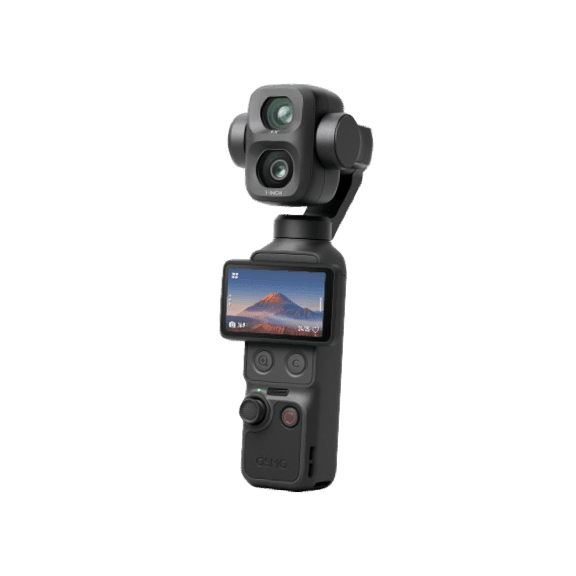
DJI Osmo Pocket 4P
A wide-angle camera and dedicated medium-telephoto camera in a stabilized handheld body. Compare the available combinations and included accessories before ordering.
Check DJI Store OptionsDJI Osmo Pocket 4P Release Date
DJI's official launch announcement is dated June 29, 2026. Availability and sales timing vary by region, so check your local store rather than treating that date as a worldwide on-sale date.
The camera has moved beyond the announcement stage. The buying question is now whether its telephoto capability and workflow fit your needs, rather than whether to wait for a rumored release.
Spec Comparison: DJI Osmo Pocket 4 vs. Osmo Pocket 4P
The dedicated medium-telephoto camera is the main reason to move up to the 4P. Several everyday features are shared, so don't assume that every specification improves with the more expensive model.
| Feature | Osmo Pocket 4P | Osmo Pocket 4 |
|---|---|---|
| Lens arrangement | 20mm-equivalent wide-angle + 60mm-equivalent medium telephoto | 20mm-equivalent wide-angle |
| Sensors | 1-inch main + 1/1.28-inch telephoto | 1-inch main |
| Weight | 230g | 190.5g |
| Screen | 2.0-inch, 1000-nit touchscreen | 2.0-inch, 1000-nit touchscreen |
| Built-in microphones | 3 | 3 |
| Battery capacity | 1545mAh | 1545mAh |
| Best reason to choose it | Dedicated telephoto compositions and additional wide-camera grading capability | Lighter everyday wide-angle filming |
The 4P adds 39.5g, or about 21% more body weight. That may look small on a specification sheet, but it is worth checking with your preferred grip attached.
Sources: DJI Pocket 4P specifications and DJI Pocket 4 specifications.
DJI Osmo Pocket 4P Key Buying Points
Dual Lenses: Wide-Angle Coverage and a Dedicated Telephoto View
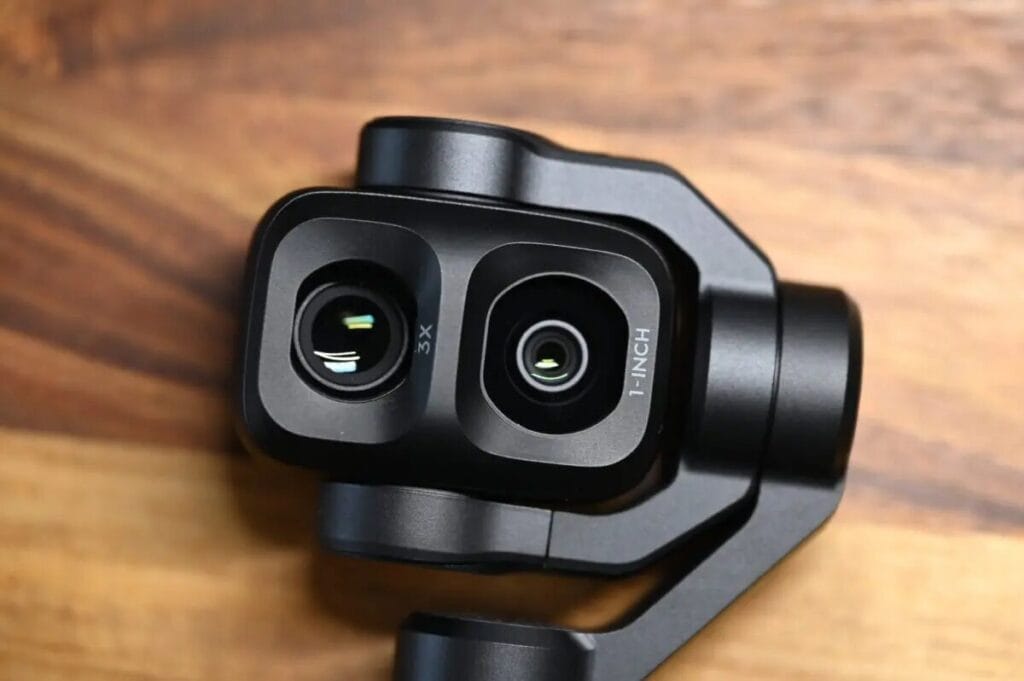
The wide camera uses a 20mm-equivalent f/2.0 lens. The separate medium-telephoto camera uses a 60mm-equivalent f/1.8 lens. One gives you the scene around the subject; the other lets you compose more tightly from farther away.
That is useful for a travel sequence: establish the location, then film a face, a sign or a detail without making every shot look like a wide selfie. It also gives you a different portrait working distance.
The change in perspective comes from where you stand. A longer lens lets you step back while keeping the subject large in the frame, which can avoid the exaggerated facial proportions of a close wide-angle shot.
Image Quality and D-Log 2: Know Which Camera Gets the Feature
DJI rates the new wide-angle sensor at up to 17 stops of dynamic range in D-Log 2. Treat that as a manufacturer claim under the specified conditions, rather than a guarantee that every mode retains the same range.
D-Log 2 is limited to 1× wide-angle shooting.
Don't buy the camera expecting to combine the maximum zoom with the same D-Log 2 capability. Check the available profile and recording mode for the lens you intend to use.
For a grading workflow, the benefit is more room to manage difficult highlights and shadows before delivering the final image. You still need sensible exposure, a suitable transform and time in post-production. If you want to share clips immediately, compare the normal color output too.
See DJI's profile and mode explanations for current restrictions.
4K 240fps Slow Motion: Useful, but Lens-Dependent
The wide-angle camera supports 4K240 slow-motion recording. The medium-telephoto camera tops out at 4K200 in slow motion. These are separate from normal video recording, which is listed up to 4K60.
At 240fps, playback on a 30fps timeline gives you 8× slow motion; on a 24fps timeline, it gives you 10×. There is no single slow-motion multiplier without specifying the playback frame rate.
I'd use it for short moments that benefit from being slowed down: water, an action detail or a quick movement. High frame rates need enough light and aren't an automatic improvement for a dim concert or an ordinary talking shot.
Zoom: Separate the 3× Optical View from 12× Magnification
| Framing | What it means | How I'd use it |
|---|---|---|
| 1× | Wide-angle camera | Selfies, establishing shots and groups |
| 3× | Dedicated 60mm-equivalent telephoto camera | Portraits and tighter details |
| 6× | Additional magnification beyond the telephoto camera's native view | Compare detail before committing to the shot |
| Up to 12× | Maximum zoom in supported video modes, including digital magnification | Use when distance matters more than maximum detail |
The dedicated telephoto camera is the meaningful upgrade. Beyond its native framing, inspect the result rather than assuming every zoom level looks equally clean.
For concerts, start with a stable grip and enough space around the performer. A tighter frame makes small movements easier to notice, and neither zoom nor tracking can remove an audience member blocking the view.
3-Axis Stabilization and ActiveTrack
The combination of a mechanical gimbal and subject tracking is useful when you film alone. I'd judge it by the shot: whether the subject stays composed, whether focus holds and whether the movement feels natural.
DJI lists ActiveTrack 8.0. Test it at your intended focal length before an important recording. A person crossing the frame, a sudden direction change or a tight composition can still require your attention.
A gimbal also doesn't remove every part of walking motion. Footsteps, vertical movement and camera handling still affect the result, particularly when using a tighter view.
Accessories and Audio: Price the Setup You Will Actually Use
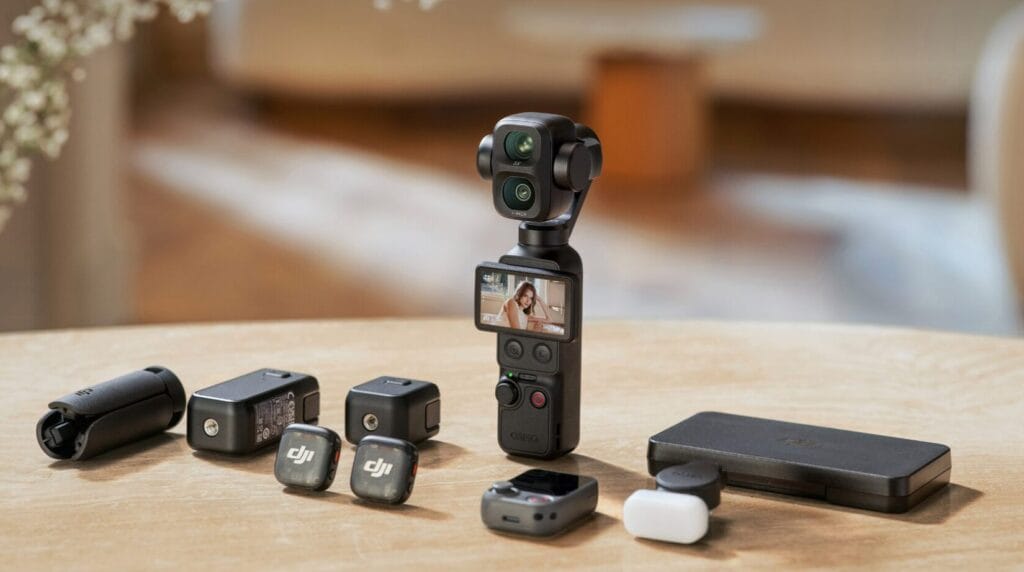
For spoken content, microphone placement can matter more than another camera specification. Compare an external microphone when the camera will be far from your mouth, rather than expecting the built-in microphones to deliver the same result at every distance.
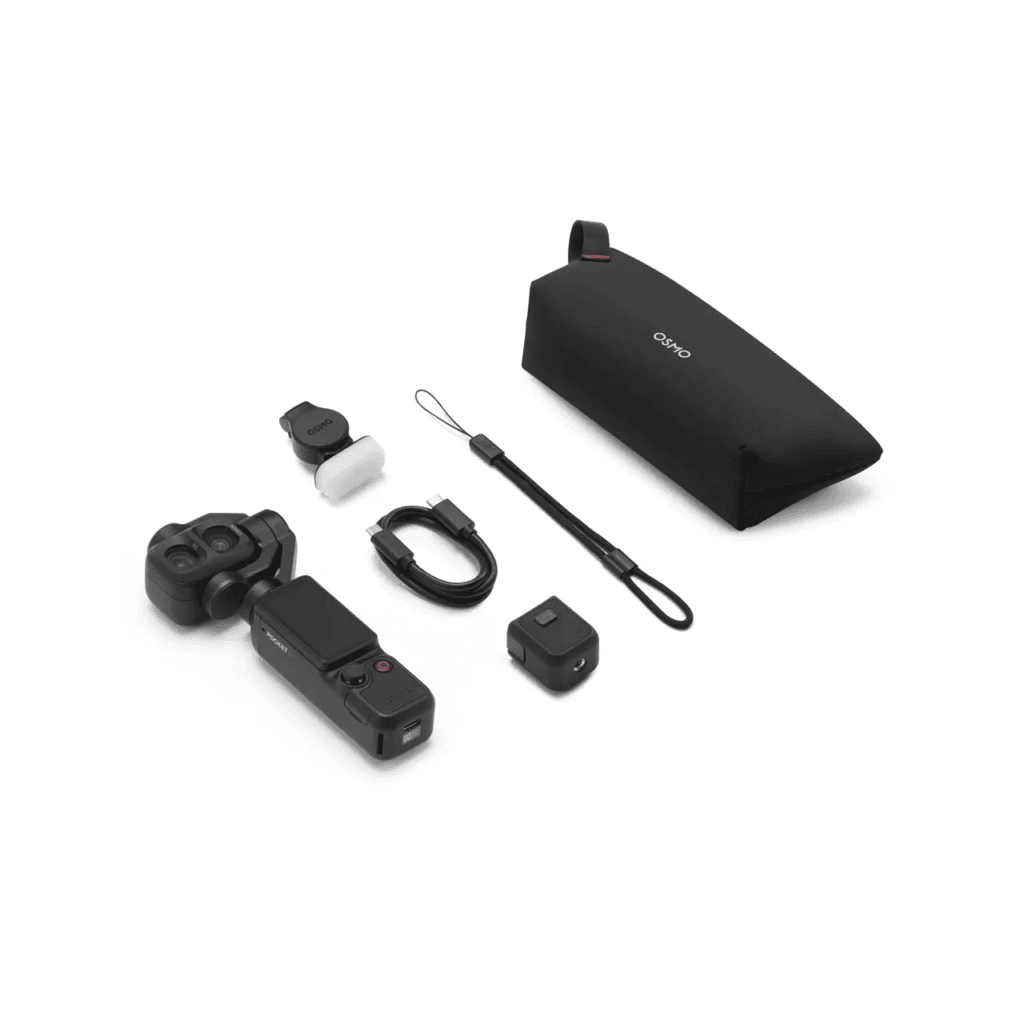
The system includes options for audio, lighting, filters, power and remote viewing. Buy them around your workflow: a seated interview, a walking vlog and a concert recording need different setups.
Before upgrading from another Pocket model, check accessory compatibility individually. A familiar product name doesn't guarantee that a cover, filter or bag fits the larger camera head.
Screen, Storage and Battery: Useful Everyday Details
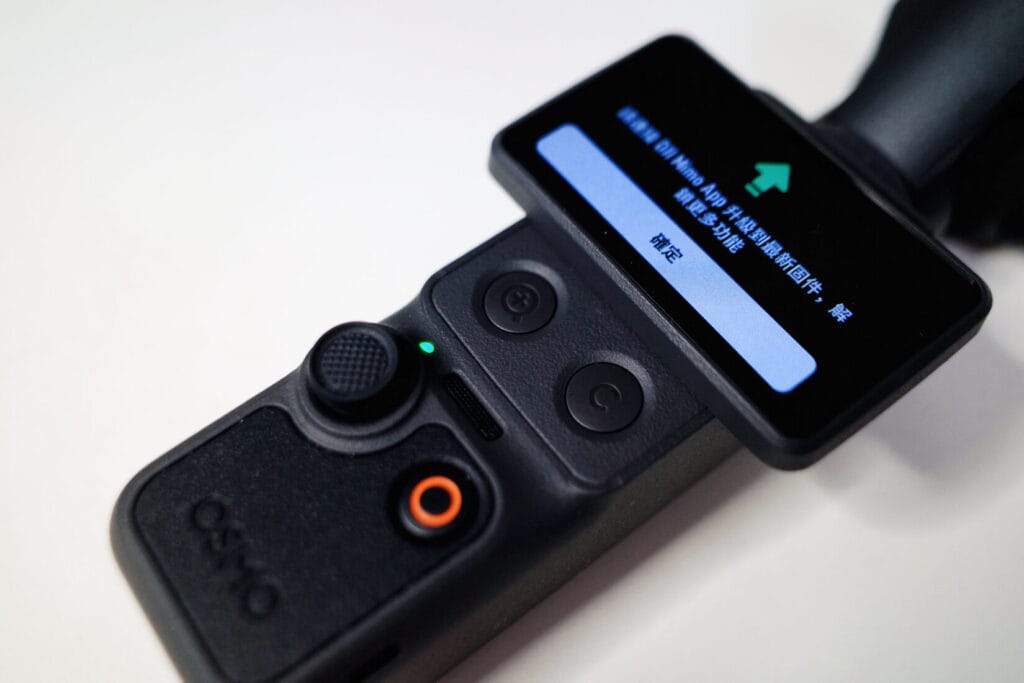
The rotating touchscreen is a 2.0-inch display rated at 1000 nits. Try the interface in the orientation you use most, especially if you often film yourself or adjust settings one-handed.
DJI lists 103GB of built-in storage and microSD support up to 1TB. Internal storage is useful when you forget a card, but it still needs a backup routine.
The published maximum runtime is 210 minutes, measured at 25°C in 1080p24 with Wi-Fi and the screen off. That isn't a promise of three and a half hours in 4K, with tracking, a bright screen and attached accessories.
For a long event, plan around your actual mode and charging opportunities. Storage capacity, battery life and thermal limits are separate constraints.
Who Should Buy the Osmo Pocket 4P?
I'd start by looking through your recent footage. How often did you want a closer view but couldn't move toward the subject? How often did a heavy crop fail to give you enough detail? If those problems come up regularly, the second camera has a clear purpose.
If most of your footage is wide-angle travel, talking to the camera or everyday clips, don't assume you need the 4P. A lighter setup that you carry more often can be the better purchase.
DJI Osmo Pocket 4P Pros and Cons: 5 Advantages and 6 Trade-Offs
The dual-camera design gives you more framing options. The decision is whether those options justify the extra weight, cost and workflow requirements.
5 reasons to consider it
- Two useful native views Wide shots and tighter compositions no longer depend entirely on cropping the same camera.
- A dedicated telephoto starting point For distant details, the separate camera gives you a more useful starting image than simply enlarging a wide shot.
- A wide-angle sensor designed for difficult contrast The new sensor and its specified high-dynamic-range mode are worth comparing for backlit scenes.
- An additional grading option D-Log 2 may suit creators who already expose, transform and grade their footage deliberately.
- A better working distance for some portraits The tighter native view lets you step back while keeping a person prominent in the frame.
6 trade-offs before buying
- More weight and a different balance The larger camera head changes how the setup feels. Try it with the grip you intend to use, rather than judging portability by body weight alone.
- Long recordings still need thermal planning Don't assume a large card guarantees an uninterrupted event recording. Test your planned mode and environment; no controlled heat comparison is presented here.
- Battery capacity doesn't tell the full story The 4P and Pocket 4 have the same listed battery capacity. Recording mode, screen use and accessories can change runtime.
- Lens switching needs a continuity check For a continuous take, inspect framing, focus and color during transitions. Don't assume every camera mode or profile remains available as you zoom.
- Some existing accessories won't transfer Fit-specific covers and lens accessories need checking. Replacing them can add to the upgrade cost.
- You pay for capabilities you may not use If you mainly want a small wide-angle camera, the additional lens and grading options may add cost and weight without improving your routine.
The thermal and handling points above are buying considerations, not newly measured failure limits. I'd test a continuous recording at the settings I plan to use before relying on the camera for an interview or performance.
DJI Osmo Pocket 4P vs. Insta360 Luna Ultra
Both cameras offer a wide-angle view and a dedicated telephoto option. The more useful comparison is how you frame, monitor, carry and edit your footage.
| Buying consideration | DJI Osmo Pocket 4P | Insta360 Luna Ultra |
|---|---|---|
| Native focal lengths | 20mm + 60mm equivalent | 20mm + 60mm equivalent |
| Body weight | 230g | 233g black / 235g white |
| Screen approach | Rotating touchscreen | Detachable touchscreen |
| Built-in storage | 103GB | 47GB |
| Maximum microSD capacity | 1TB | 2TB in current guidance |
| Main workflow to compare | DJI controls, supported grading modes and Osmo accessories | Detachable monitoring, color options and POV accessories |
| Original regional price converted to USD | Approx. US$598.86 | Approx. US$725.16 |
The body-weight difference between these two is small. I'd pay more attention to the complete setup and how it sits in your hand than to a few grams between bare cameras.
Luna specifications: official product specifications. For its optional setup, see the Luna Ultra accessory guide.
Choose Pocket 4P if:
- You expect to use the dedicated telephoto view regularly.
- You want its supported grading workflow.
- You prefer the DJI controls and accessory system.
- The camera feels comfortable with your chosen grip.
Compare Luna Ultra closely if:
- A detachable monitoring screen changes how you film.
- You want to explore its supported POV accessories.
- You prefer its color output after comparing matching scenes.
- Its complete bundle better matches the accessories you need.
DJI Osmo Pocket 4P FAQ
Is the Pocket 4P Worth Buying Instead of the Pocket 4?
Consider it when a dedicated telephoto view solves a regular problem. If most of your footage is wide-angle, compare the lighter Pocket 4 before paying for features you may rarely use.
Is 12× Zoom Fully Optical?
No. The camera has separate wide-angle and telephoto views, with further magnification in supported modes. Don't expect maximum zoom to retain the same detail as the native telephoto view.
Does D-Log 2 Work on the Telephoto Camera?
DJI currently restricts D-Log 2 to 1× shooting. Check the available profile when changing lenses or recording modes rather than assuming the feature applies across the full zoom range.
Will My Pocket 3 or Pocket 4 Accessories Fit?
Compatibility varies by item. DJI lists the Pocket 4 Battery Handle and Fill Light as compatible, while its size-specific cover and bag aren't interchangeable with the 4P. Pocket 3 lens accessories and its cover also don't fit. Check the current accessory page before reusing or replacing anything.
Does It Overheat During Long Recordings?
This article does not establish a measured shutdown time. Temperature, recording settings, airflow and power use affect a long session. Test the complete setup in comparable conditions before relying on it for a continuous event.
Is It a Good Camera for Concerts?
The dedicated telephoto view makes it worth comparing, but distance, lighting, audience obstructions and venue camera rules still matter. Watch sample footage at the framing you expect to use, rather than judging the camera only by its maximum zoom number.
Final Verdict: Is the DJI Osmo Pocket 4P Right for You?
The Pocket 4P's strongest argument is simple: you get a dedicated tighter view alongside the wide camera. For portraits, details and subjects you can't approach, that can change the shots you bring home.
I'd weigh that against grip comfort, the recording modes I actually use and the cost of the full setup. The right upgrade is the one that solves a recurring limitation, not the one with the longest feature list.
Compare the complete setup, then test the shots that matter to you.
- Try the grip and balance with accessories attached.
- Check lens-specific frame rates and color profiles.
- Confirm which existing accessories can be reused.
- Plan storage, power and continuous recording separately.
- Compare the local bundle price and warranty coverage.